Why Every K-12 District Needs a Post-Phish Incident Response Plan
How your district handles the aftermath When Staff Click: Best Practices for Post-Phish Incident Response in K–12 can mean the difference between a minor disruption and a major data breach. Your response in the first hour after a staff member clicks a malicious link determines the outcome.
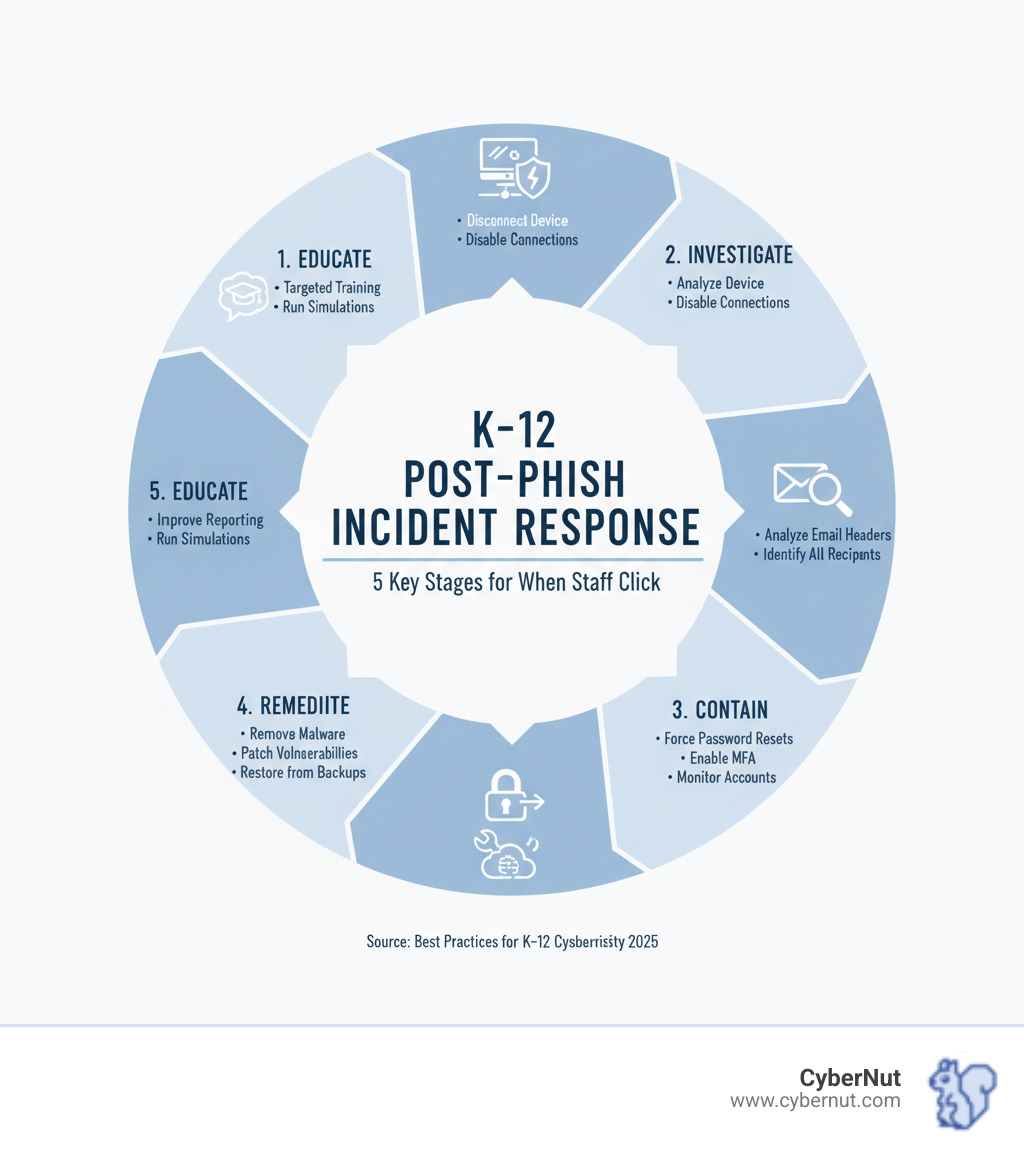
Quick Action Checklist: When a Staff Member Clicks a Phishing Link
- Isolate the affected device from the network immediately.
- Report the incident to IT security without deleting any evidence.
- Investigate the email to identify other potential victims.
- Contain the threat by resetting passwords and monitoring accounts.
- Educate staff to prevent future incidents.
The education sector has the lowest phishing email reporting rate at just 9%, allowing threats to spread undetected. Cybercriminals actively target valuable K-12 data, including student records (FERPA), financial information, and personal details. With most schools facing cyber incidents, the stakes are incredibly high.
Most districts operate with limited IT staff and tight budgets, yet face the same sophisticated threats as large corporations. The good news is that an effective response doesn't require a massive budget. It requires a clear, actionable plan for when—not if—someone clicks.
When a staff member clicks a malicious link, time is your most critical asset. A calm, quick response is essential. The first rule of When Staff Click: Best Practices for Post-Phish Incident Response in K–12 is to assume compromise until proven otherwise. Malware could be installing in the background, or a spoofed login page may have harvested credentials.
The staff member's role is crucial:
- Report immediately: Do not hesitate or feel embarrassed. The IT team needs to know as soon as possible.
- Do not delete the email: It is vital evidence for the investigation.
- Do not enter any data: If the link led to a login page, do not enter credentials. If you already have, inform IT immediately.
- Provide details: Share the email subject, sender, time of the click, and any unusual behavior.
For the IT team, the immediate response involves acknowledging the report and initiating the isolation process to limit damage and prevent the threat from spreading.
How to Effectively Isolate Affected Devices
Once a click is reported, the top priority is to isolate the affected device to cut off its access to the network.
- Disconnect from the network: Unplug the Ethernet cable for desktops. For wireless devices, turn off Wi-Fi and Bluetooth, and forget saved networks.
- Power down if necessary: If you can't disconnect immediately or suspect active malware, shut down the device. Note the time of isolation.
- Use network segmentation: If available, move the device to a quarantined network segment to limit its interaction with other systems.
- Leverage EDR tools: Endpoint Detection and Response (EDR) tools can often detect suspicious activity and automatically isolate the device from the network.
Initial Communication and Data Preservation
While isolating the device, effective communication and data preservation are vital.
- Use out-of-band communication: Communicate via phone or a secure messaging app, especially if the email system may be compromised.
- Document initial findings: Start a log immediately, recording the date, time, user, email details, symptoms, and every action taken. This is critical for investigation and compliance.
- Preserve the phishing email: Secure a copy of the original phishing email for analysis.
- Back up essential data: If the device is isolated but not yet fully compromised (e.g., only credentials were leaked), consider backing up critical files to a pre-scanned external drive. Avoid backing up executables or recently downloaded files.
Investigation and Containment: Assessing the Breach in a K-12 Environment
Once the device is isolated, the next phase in When Staff Click: Best Practices for Post-Phish Incident Response in K–12 is investigation and containment. The goal is to understand what happened, assess the damage, and prevent the threat from spreading.
The Process for Investigating a Phishing Incident
The investigation phase involves gathering clues to understand the full scope of the attack.
- Analyze email headers: Trace the email's origin and true sender to understand the attack vector.
- Analyze links and attachments: Use sandboxing tools to safely open links and attachments in an isolated environment to identify malicious destinations or payloads.
- Search email logs: Filter logs by the sender or subject line to find all other recipients of the phishing message.
- Identify all recipients: Discreetly verify with each recipient if they also clicked the link. If so, repeat credential resets and device scans for each affected user.
- Correlate with security alerts: Check your Security Information and Event Management (SIEM) system for related alerts that can help connect the dots.
Containing the Breach and Managing Credentials
Containment focuses on limiting the damage and securing compromised accounts.
- Force password resets: If credentials were potentially compromised, immediately force a password reset for all affected accounts.
- Enforce strong password policies: Emphasize that new passwords must be strong, unique, and not previously used. Consider rolling out a password manager.
- Enable Multi-Factor Authentication (MFA): MFA is a critical defense. If not already active, enable it immediately for all users, especially those with liftd privileges.
- Monitor accounts for suspicious activity: Set up extra monitoring on affected accounts for unusual logins, MFA changes, privilege escalation attempts, or new mailbox forwarding rules.
- Use account lockouts: If you detect clear signs of unauthorized access, implement an immediate account lockout to prevent further malicious activity.
Reporting and Compliance: Navigating K-12 Legal and Communication Protocols
Beyond the technical response, a phishing incident in a K-12 environment requires careful attention to reporting and compliance duties. Handling sensitive student and staff information correctly is crucial.
Best Practices for Reporting Phishing Incidents Internally and Externally
Clear reporting channels help everyone act quickly and effectively.
For internal communication, your plan should kick in immediately. Notify IT security, brief management, and involve HR and legal counsel early, especially if employee information or compliance rules are a concern.
Creating a culture of no-blame reporting is essential. Staff should feel safe reporting incidents, not fear punishment. Frame reporting as a positive, helpful action that protects the district. Making it easy to report, such as with a "Report Phishing" button, can significantly increase reporting rates.
For external reporting, you may need to notify outside agencies depending on the severity:
- Report major cybercrimes to the FBI’s Internet Crime Complaint Center (IC3) and the Cybersecurity and Infrastructure Security Agency (CISA).
- Comply with your state's breach notification laws, which dictate when and how to report exposed personal data.
- Share information with K-12 security organizations like the Multi-State Information Sharing and Analysis Center (MS-ISAC) and K12 SIX to gain threat insights.
Legal and Compliance Considerations for K-12 Data Breaches
A phishing incident that becomes a data breach raises significant legal questions. This is where When Staff Click: Best Practices for Post-Phish Incident Response in K–12 helps guide you through complex regulations.
Key laws include:
- FERPA (Family Educational Rights and Privacy Act): Protects student education records. A breach involving student data requires careful assessment and potential notification.
- COPPA (Children's Online Privacy Protection Act): May apply if the breach affects online services used by children under 13.
- State data privacy laws: Many states have their own privacy and breach notification laws that must be followed.
Document everything carefully, from findy to resolution. This includes all communications, evidence, and actions taken. A clear "chain of custody" for digital evidence is vital for any potential legal proceedings.
Finally, communicating with parents and the community requires a delicate balance of transparency and security. Your communication plan should outline when and how to inform stakeholders about a breach, what happened, and what you're doing to fix it.
Building Resilience: Proactive Strategies for When Staff Click: Best Practices for Post-Phish Incident Response in K–12
The aftermath of a phishing incident is a valuable opportunity to strengthen your defenses. Every incident provides lessons that help your district move from being reactive to truly resilient.

How to Educate and Support Staff After a Phishing Incident
Education and support are key to our strategy for When Staff Click: Best Practices for Post-Phish Incident Response in K–12. The goal is to learn and improve, not to assign blame.
- Conduct a post-incident debrief: Bring together the involved staff, IT, and leadership to discuss what happened and how to improve processes or technology.
- Offer targeted training: Provide personalized help for affected staff on topics like spotting phishing red flags and understanding social engineering.
- Reinforce reporting procedures: Remind everyone how and why to report suspicious emails, emphasizing that it keeps the entire district safer.
Many free resources can help K-12 staff improve their cyber awareness:
- Cybersecurity Awareness Training from Amazon
- Educator resources from CYBER.ORG
- Federal Virtual Training Environment (FedVTE) Public Courses
- SchoolSafety.gov's Cybersecurity Topic Page
Here at CyberNut, we offer fun, gamified micro-trainings custom for K-12 schools. Our goal is to help you build a strong "human firewall" within your district.
Strengthening Technical Security and Data Backups
A phishing incident often reveals technical weaknesses. Here’s how to strengthen them:
- Strengthen spam filters: Configure your filters to block suspicious emails and implement email authentication standards like SPF, DKIM, and DMARC.
- Use URL filtering: Block access to known malicious websites to prevent users from reaching dangerous sites even if they click a link.
- Deploy endpoint protection: Ensure strong Endpoint Detection and Response (EDR) tools are on all school devices to automatically detect and isolate threats.
- Secure data backups: Maintain isolated backups to protect against ransomware. Follow the 3-2-1 backup rule: keep 3 copies of your data on 2 different media types, with 1 copy offsite. Regularly test your backup restoration process to ensure it works when needed.
The Role of Phishing Simulations and Awareness Training
While technology is vital, your people are your strongest asset. Phishing simulations and awareness training are about changing behavior.
- Focus on behavior-based training: Schools using this approach have seen significant reductions in successful phishing attacks.
- Move beyond click rates: The education sector has a low phishing reporting rate (9%). A low click rate is good, but a high reporting rate is better. It shows staff are actively identifying threats. Encourage reporting by making it easy.
- Use role-based simulations: Leaders are often targeted with sophisticated attacks. Tailor simulations to the unique threats different roles face.
- Measure reporting rates: Celebrate and reward staff who report suspicious emails. A high reporting rate gives your security team early warnings and demonstrates a proactive security culture.
Creating Your K-12 Incident Response Plan
A well-defined incident response plan (IRP) is your district's roadmap for navigating a cyber crisis like a phishing attack. This plan should be a living guide custom to your school's unique environment, resources, and regulatory requirements.
![[object Object]](https://cdn.prod.website-files.com/6797b8ab425373f1b04db39f/692a2c972ca760dac3264156_065dfbcdfbd8742f8f9d56f12578ccdc39832d5a.jpeg "[object Object]")
Key Components of a Cyber Incident Response Plan for K-12
Your IRP should align with trusted frameworks like the NIST Cybersecurity Framework and use K-12 specific resources like the K12 SIX Essential Cyber Incident Response Runbook. Key components include:
- Preparation: Conduct risk assessments, establish a dedicated response team with clear roles, develop and practice the plan, and set up out-of-band communication channels.
- Detection & Analysis: Define clear reporting procedures, implement monitoring tools, and create a triage process to assess incident severity.
- Containment, Eradication & Recovery: Isolate affected systems to limit damage, remove the threat (e.g., malware), and restore systems from secure backups.
- Post-Incident Activity: Conduct an "after-action" review to identify lessons learned and update your IRP accordingly.
- Communication Plan: Woven throughout all stages, this plan defines who communicates what, when, and to whom—including staff, parents, law enforcement, and the media.
Leveraging Grants and External Partnerships
You don't have to handle cybersecurity alone. Valuable resources and partners are available to help K-12 districts improve their incident response capabilities.
- Seek out grants: Explore the State and Local Cybersecurity Grant Program (SLCGP) and other federal, state, and local grants for technology and security initiatives. Work with your state planning committee to access these funds.
- Build partnerships: Collaborate with local law enforcement, your local FBI office, and CISA regional personnel before an incident occurs. These relationships provide invaluable support during a crisis.
- Engage with K-12 security communities: Join groups like MS-ISAC and K12 SIX for threat intelligence, best practices, and peer support.
Frequently Asked Questions about Post-Phish Incident Response in K-12
What if a student clicks on a phishing link on a school device?
When a student clicks a phishing link, the same core principles apply as with staff incidents, but with a student-centric approach. The key is to encourage students to report mistakes without fear of punishment.
Follow these steps:
- Isolate the device immediately to prevent any malware from spreading.
- Have the student or a teacher report the incident to IT as quickly as possible.
- Assess if any personal data or credentials were compromised, keeping FERPA guidelines in mind.
- Use it as a teachable moment to educate the student about online safety and digital citizenship in a supportive way.
How can our under-resourced district afford to improve cybersecurity?
Improving cybersecurity doesn't always require a large budget. Many effective strategies are low-cost or free.
- Leverage free resources: Government agencies like CISA and non-profit organizations offer a wealth of free guidance, tools, and training materials.
- Pursue cybersecurity grants: Actively apply for funding from programs like the State and Local Cybersecurity Grant Program (SLCGP).
- Prioritize high-impact, low-cost measures: Implementing Multi-Factor Authentication (MFA) and investing in effective user awareness training offer a huge return on investment by strengthening your human defenses.
- Demand security from vendors: Ensure your technology providers include essential security features without extra charges.
How do we create a "no-blame" culture around reporting security incidents?
Building a "no-blame" culture is foundational to effective security. When staff feel safe reporting incidents, they become your best defense against threats.
- Leadership must set the tone: District leaders should publicly and consistently communicate that reporting is a positive action that protects the community.
- Frame reporting as helpful: Emphasize that every report, even a false alarm, provides valuable intelligence.
- Reward reporting: A simple thank you or recognition can reinforce the desired behavior.
- Focus on process, not people: During post-incident reviews, ask "How can we improve our system?" instead of "Who made a mistake?" This encourages open discussion and continuous improvement.
Conclusion: From Reactive to Resilient
Your district's response in the first hours after a phishing click determines the outcome. Throughout this guide on When Staff Click: Best Practices for Post-Phish Incident Response in K–12, we've outlined the essential steps to turn a potential crisis into a manageable incident.
Remember the core sequence: Isolate the device, Investigate the threat, Contain the breach, Remediate the system, and Educate your staff. Security is not a one-time project but an ongoing program of continuous improvement. Every incident is an opportunity to learn and strengthen your defenses.
K-12 districts face unique challenges with limited budgets and small IT teams. However, you don't need unlimited resources to build a strong security posture. You need a clear plan, engaged staff, and the right partners.
By fostering a culture where reporting is celebrated, providing ongoing training, and equipping your team with clear protocols, you transform your staff into your strongest defense—a human firewall. This shifts your district from being reactive to resilient.
At CyberNut, we understand the pressures K-12 districts face. Our gamified micro-trainings are designed for schools, making cybersecurity training engaging for staff and low-touch for your IT team. We help you build that human firewall, turning security awareness into genuine behavioral change.
Don't wait for the next attack. Take proactive steps to build a stronger security posture today.
Get a complimentary phishing audit for your district to understand your current vulnerabilities.
Ready for comprehensive protection? Develop a robust data security and privacy plan for your school to address all aspects of your cybersecurity program.




.png)
.png)

.png)
.png)
.png)
.png)